 RSS Feed
 Twitter


 7:22 AM
 sheva
sheva
I have ever posted about how to create favicon on your blog. It's long time ago, when we did it manually. A litle bit hack on your blog code. For most blogger, having favicon is like blog identity. It reprensent your blog talking about.
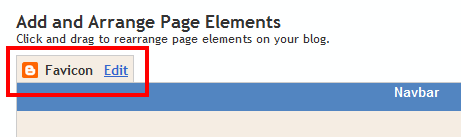
A good news come from Blogger. Now you can add a custom favicon from the Design | Page Elements tab (or, from the Layout tab if you're using the new user interface), by clicking Edit on the new “Favicon” setting above the navbar element. This is still draft/beta testing feature so you have to access your blog from http://draft.blogger.com
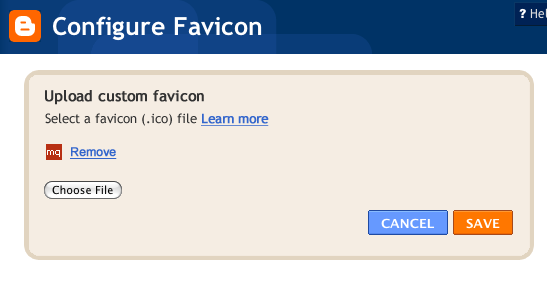
A new window will then open where you can select an image from your hard drive to replace the default favicon image. This initial launch only supports .ico files, but you can easily convert your JPEG, PNG, or other non-ico image file using your own image software. There are also many conversion tools online, and a quick Google Search brings up a handful of options such as http://www.icoconverter.com/. Wish for the final version, it will be available on blogger dashboard and support all image file type.
When you save your template changes, you’ll see your newly-added favicon image displayed in your browser window or tab.

That’s it your blog favicon
A good news come from Blogger. Now you can add a custom favicon from the Design | Page Elements tab (or, from the Layout tab if you're using the new user interface), by clicking Edit on the new “Favicon” setting above the navbar element. This is still draft/beta testing feature so you have to access your blog from http://draft.blogger.com
A new window will then open where you can select an image from your hard drive to replace the default favicon image. This initial launch only supports .ico files, but you can easily convert your JPEG, PNG, or other non-ico image file using your own image software. There are also many conversion tools online, and a quick Google Search brings up a handful of options such as http://www.icoconverter.com/. Wish for the final version, it will be available on blogger dashboard and support all image file type.
When you save your template changes, you’ll see your newly-added favicon image displayed in your browser window or tab.
That’s it your blog favicon


